AI memory is how an AI model keeps information, both within a single conversation and across conversations. Most AI memory is short and personal. It knows a lot about the world, but very little about your Tuesday. Timeglass gives AI a memory of how your business actually works, built from the work itself: what was done, for which client, on which project, by whom, and why.
Close the chat and the context is gone. Open a new one and you start over, re-explaining the client, the project, the decision you made last week. We think the fix isn't a bigger memory inside the model. It's an extended memory: AI memory that lives outside it.
This post covers the three types of AI memory, what a context window is, why context rot makes AI forget, how ChatGPT, Claude and Gemini memory compare, and what extended memory is, with real examples from our own team.
What Is AI Memory? The 3 Types Explained
AI memory comes in three types: what a model learned in training, what it can see in the current conversation (its context window), and what a product saves between chats. Each works differently, and none of them on its own remembers your team's work. Think of a new hire's education, desk and notebook.
Training data (parametric memory)
Education: what the model learned in training. Like a new hire's degree, the model arrives knowing a lot in general: language, facts, how code works. This knowledge is baked into the model's weights, which is why engineers call it parametric memory. It's frozen on the day training ends, the "knowledge cutoff." It can't learn anything new while you talk to it, and it can't tell you where it learned a given fact.
The context window (working memory)
A context window is the amount of text an AI model can see and work with at once, measured in tokens. A token is a chunk of text about three-quarters of a word long. Think of it as the desk: your messages, the model's replies, files you've uploaded and results from tools it uses. Here's the part most people don't realize: the model has no memory between replies. Every time it answers, the whole conversation is handed back to it from scratch. When the desk fills up, older pages get thrown away or squeezed into a summary.
Persistent memory (saved between chats)
The notebook: what a product saves between conversations. ChatGPT, Claude and Gemini can now "remember you" across chats. But the model isn't remembering anything. The product writes notes into a database, then slips the relevant ones back onto the desk when they seem useful. Technically it's a form of retrieval (RAG, or retrieval-augmented generation): the model doesn't remember you, a search system reminds it.
Why AI Memory Matters for Businesses
AI memory matters because it turns a smart stranger into a useful colleague. With memory, an AI can skip the re-explaining, keep long projects coherent, personalize its work and answer questions about the past, which is where most business questions live.
A model with no memory of your work can write a good email. A model that remembers your work can write the right email: to the right person, referencing the right decision, in the tone that's been working. That's why every AI company is racing to add memory. It's used to:
- Skip the re-explaining. You stop pasting the same background into every new chat.
- Keep long work coherent. A project that spans weeks needs the model to know what was decided in week one.
- Personalize. Preferences, style and recurring people carry over automatically.
- Answer questions about the past. "What did we promise this client?" "When did we last touch that bug?" Without memory, the AI can only guess.
For a business, the last one is the big one. Where did the time go? Why did we decide that? What's the status? An AI can only answer those if something remembered the past for it.
Why Does AI Forget? The Limits of AI Memory
AI forgets because each type of AI memory has a hard limit. Training knowledge is frozen at a cutoff date, the context window is finite and gets less reliable as it fills, and saved chat memory keeps only thin notes. None of them was ever given the raw facts of your work.
Training knowledge is frozen and generic. It stops at the cutoff date, and it never included your company in the first place. Why: training a frontier model takes months and enormous compute. You can't retrain it every time your team has a meeting.
The desk is finite. Even a huge context window has an edge. When it fills, older material is dropped or compressed, and details get lost in the summary. Why: the model re-reads everything on the desk for every reply, holding it in a store called the KV cache that grows with every token. More context means more computer memory, more cost and slower answers.
The notebook is thin and opaque. Product memory saves short notes, not the full record. You often can't see what it saved or why it pulled one note and not another. It belongs to one person, inside one assistant. Why: these features were built to personalize a chat, not to be a system of record for a business.
Everything you did outside the chat, which is nearly everything, was never recorded anywhere an AI could reach.
What Is Context Rot?
Context rot is the drop in an AI model's accuracy as its input gets longer, even on simple tasks. A bigger desk doesn't mean better reading.
In July 2025, Chroma published research on context rot that tested 18 models from Anthropic, OpenAI, Google and Alibaba. Performance became less reliable as input grew, even on simple retrieval tasks. Accuracy fell faster when the question was worded differently from the answer, and when similar but wrong passages ("distractors") were nearby. With distractors, Claude models tended to decline to answer, while GPT models more often answered wrongly. Oddly, models did better on shuffled text than on coherent documents.
The practical rule: a model's useful context window is often much smaller than its advertised one, and a small amount of relevant context beats a pile of everything.
Context Window Sizes: Claude vs ChatGPT vs Gemini (2026)
The Claude context window, the ChatGPT context window and the Gemini context window are now roughly equal: about 1 million tokens for each provider's flagship models, or roughly 750,000 words. The bigger differences are in maximum reply length, price, and how well each model holds up at long lengths.
Google led for years: Gemini 1.5 offered 1 to 2 million tokens when others offered 128,000 to 200,000. OpenAI introduced a 1-million-token context window with GPT-4.1 in April 2025, and Anthropic added it to Claude Sonnet 4 in August 2025.
As of October 2026, from each provider's developer documentation:
| Provider | Current models | Context window (tokens) | Max reply length (tokens) |
|---|---|---|---|
| Anthropic | Claude Fable 5.1, Opus 5.5, Sonnet 5.5 | 1M | 128K |
| Anthropic | Claude Haiku 4.5 | 200K | 64K |
| OpenAI | GPT-6 Astra, GPT-6.1 Sol, GPT-6 Luna | 1.05M | 128K |
| Gemini 3.8 Flash | 1,048,576 (~1M) | 65,536 (~65K) |
Three caveats before you compare numbers:
- A token isn't the same everywhere. Each company splits text differently, so the same document comes out to a different count on each.
- The apps often give you less than the developer platform. Your plan and mode set the real limit in the ChatGPT, Claude or Gemini app.
- Size isn't skill. In 2024 testing on the RULER benchmark, which runs harder tasks at growing lengths, GPT-4 scored 96.6 at 4K tokens but 81.2 at 128K. Gemini 1.5 Pro barely moved (96.7 to 94.4), which is how Google earned its long-context reputation. Comparable published scores for the 2026 models aren't available yet.
ChatGPT vs Claude vs Gemini Memory Compared
ChatGPT memory, Claude memory and Gemini memory all save information between chats, but they take different approaches. ChatGPT builds an automatic summary of you, Claude keeps separate entries you can see and edit, and Gemini ties memory into your Google account and apps.
| ChatGPT | Claude | Gemini | |
|---|---|---|---|
| Approach | An automatic, running summary of you, plus saved memories | Separate memory entries you can see and edit, plus search of past chats | Account-wide memory tied into your Google apps |
| Draws on | Past chats, saved memories, custom instructions, connected apps | Past chats; each Project keeps its own memory | Past chats plus Gmail, Workspace, YouTube and more |
| What you can see | A summary; what it uses may be broader | Entries are visible and editable | Automatic personalization is less visible |
| Opt out | Temporary Chat | Incognito | Temporary Chat (varies) |
None of them publishes a "memory size" for these features, and there's no standard benchmark vendors report against. Imports between assistants are one-time snapshots, so your memory doesn't sync between them.
Most important for businesses: all three remember one person in one app. None of them remembers a team's work.
What Is Extended Memory for AI?
Extended memory is an AI memory that lives outside the model, records what actually happened, and can be searched by any AI you connect to it. Instead of a bigger desk, it's a library next to the desk: a complete record that the AI pulls a few relevant pages from for each question.
"Extended memory" isn't a formal industry term, and no major AI vendor uses it as a product name. We use it for this specific kind of AI memory. It works with context rot instead of against it, because small, relevant context is what models handle best. For that library to be worth having, it needs five things today's memory features don't have:
- Nobody has to write it. If memory depends on people typing notes, it's incomplete by Thursday. It has to be captured as work happens.
- It records what happened, not what someone said happened. Facts with timestamps, not a chatbot's impression of you.
- You can zoom. Sometimes you need a month of a project in one paragraph. Sometimes you need the exact screen at 4:29pm on a Monday. Same memory, different altitude.
- It belongs to the team, not one chat. One person's assistant memory can't tell you what seven people decided in a meeting.
- Any AI can read it. Through MCP (Model Context Protocol, the open standard that lets AI assistants connect to outside tools and data), the same memory works in Claude, ChatGPT, Cursor or whatever you use next year.
Get those right and you have a second brain for your team. The AI stops guessing and starts citing.
How Timeglass Builds AI Memory From Real Work
Timeglass builds AI memory automatically from real work. Our desktop app captures six screenshots a minute, plus meeting audio during calls. AI turns each minute into a short structured note, then rolls those notes up into tasks, timesheet entries, daily summaries, projects and clients. Every level links back to its evidence.
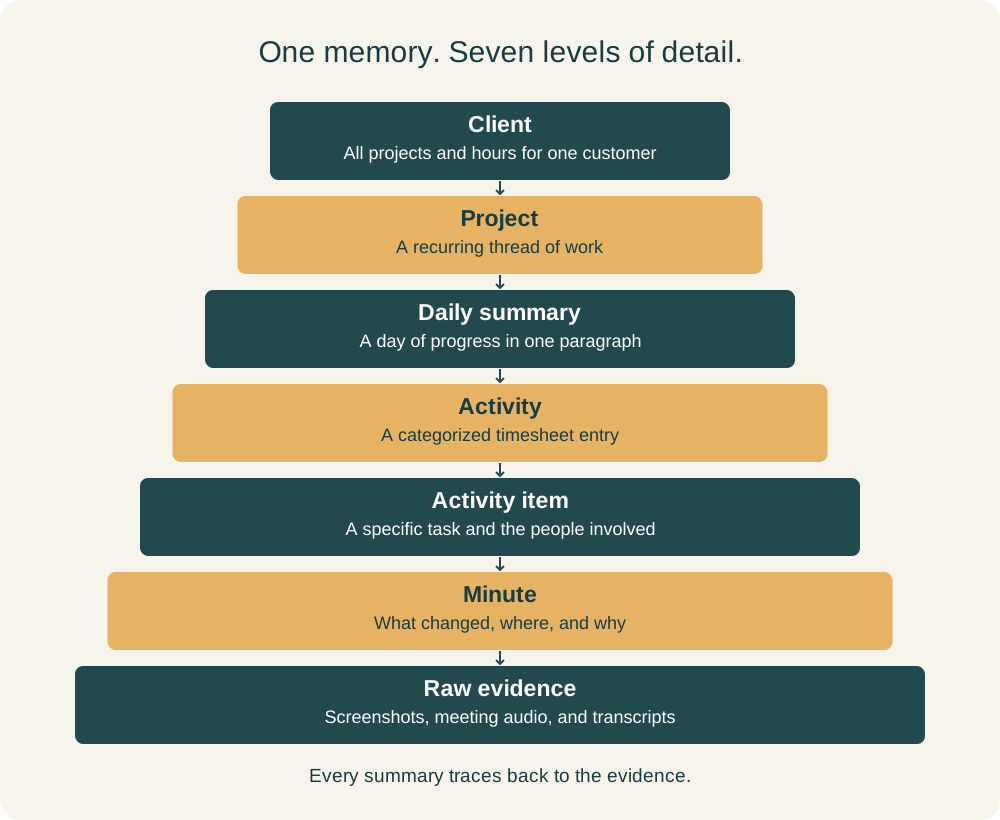
The Timeglass memory stack: every summary traces down to the screen it came from.
| Level | Example from our own team |
|---|---|
| Client | Every project, meeting and hour can be filtered to one customer |
| Project | Desktop reliability: Windows idle detection, v2.0.7 fixes. 2,987 min |
| Daily summary | Lead-gen, Oct 5: SEO pillar plan, LinkedIn swarm, Meta ad tests |
| Activity | Optimized timesheet speed, designed webhooks. 22 min, 9 people |
| Activity item | Reviewing a token-lifetime fix and Keychain migration. 7 min |
| Minute | A database filter rewritten to use a time range; the test now passes |
| Raw evidence | 6 screenshots per minute, plus meeting audio and transcripts |
Here's what each level holds, using real (lightly anonymized) records from our own team's workspace.
A minute. At 4:29pm on a Monday, one of our engineers was reviewing a fix for a stuttering timesheet screen. The minute record says which file changed (index.js), what changed (a filter now uses a time range instead of an OR condition), which endpoints it affects, and that the matching test now passes. Nobody wrote that down. The screenshots behind it are one call away.
An activity item. Later that afternoon, the same engineer spent seven minutes reviewing a batch of changes: a meeting-disclosure branch, a fix to stop users getting signed out (a 10-minute token grace period), a Keychain migration, and mockups for three new features. The record names the two colleagues involved and what each was discussing.
An activity: the timesheet entry. Those items rolled into one 22-minute entry, "Optimized timesheet performance and reviewed webhook support," filed under the right project. It lists five concrete changes and nine people involved, each tagged with their topic. Another entry from the next day captured why a feature exists: auto-padding was built to replace manual adjustments users made to hit their daily totals. That kind of reasoning usually lives in one person's head.
A daily summary. For our lead-generation project on Oct 5: a pillar-and-cluster SEO plan, landing pages for "AI timesheets" and "MCP," a LinkedIn content strategy, a Meta ad-testing framework, and research on a specific prospect. Eighty minutes, one paragraph.
A project. Most of our projects were suggested by Timeglass: it noticed a recurring thread of work and named it. "Native Desktop Reliability Update" holds 2,987 minutes since September 1, with a description, a start date and a last-active date. So "is that partnership conversation still alive?" has a factual answer: first touched Sep 16, last touched Sep 23.
A client. Projects and hours link to customers, so memory can be filtered to one client, and an AI connection can be limited to one client's data. For law and consulting firms that can't mix client information, that matters.
A meeting: decision memory. Our Oct 6 daily sync ran 125 minutes with seven people. The report captured the sales pipeline (about 65 open opportunities), a decision not to proactively offer EU data hosting to a prospect and the reason why, the rules for what good outreach sounds like, and twelve action items with owners and deadlines. The verbatim transcript sits underneath.
How to Give Claude or ChatGPT Memory of Your Work (Memory MCP)
To give Claude or ChatGPT memory of your work, connect it to an extended memory through MCP, the open standard that lets AI assistants use outside tools and data. The Timeglass MCP works as a memory MCP server for teams: any connected AI can search your team's work records, from a single minute up to a client.
Connect the Timeglass MCP to Claude or ChatGPT and you can ask:
- "What did the team ship on the desktop app last week?" Answered from the project and its daily summaries.
- "When did we last work on the sign-out bug, and who was involved?" Answered by a search across activity items.
- "What did we decide about EU hosting, and who owns the follow-up?" Answered from the meeting report.
- "Show me exactly what was on screen when that fix was tested." Answered by the minute, then its screenshots.
- "How much time did we spend on this client in September?" Answered from client and project totals.
The AI gets back a small, precise slice of memory, not a million tokens of everything, so context rot never gets a chance.
For anyone building LLM memory or AI agent memory: this isn't a bigger context window or a chat-memory feature. It's a time-indexed, hierarchical, team-wide record of work, captured passively from screens and audio, with every summary traceable to its raw evidence, served to any model over MCP. The model provides the reasoning. Timeglass provides the memory.
Common Questions
AI Memory FAQ
What is AI memory?
AI memory is how an AI model keeps information, both within a single conversation and across conversations. It comes in three types: what the model learned in training, what it can see in its context window, and what a product saves between chats. Extended memory adds a fourth: a searchable record of real work that lives outside the model.
What is a context window?
A context window is the amount of text an AI model can see and work with at once, measured in tokens (about three-quarters of a word each). As of October 2026, the flagship models from Anthropic, OpenAI and Google offer about 1 million tokens. When the window fills, older material is dropped or summarized.
What is context rot?
Context rot is the drop in an AI model's accuracy as its input gets longer, even on simple tasks. Chroma's 2025 study of 18 models found that performance became less reliable as input grew. It got worse when the question was worded differently from the answer, or when similar but wrong passages were nearby.
Does ChatGPT or Claude remember past conversations?
Yes, through product memory features. ChatGPT keeps an automatic summary of past chats plus saved memories. Claude keeps memory entries you can see and edit, can search past chats, and gives each Project its own memory. Both remember one person inside one app, and both offer a mode that skips memory.
What is a memory MCP?
A memory MCP is a server that uses the Model Context Protocol to connect an AI assistant to a memory store outside the model. The assistant searches it and pulls in only what is relevant to the question. The Timeglass MCP is a memory MCP for teams, built from real work records rather than chat history.
How is extended memory different from ChatGPT or Claude memory?
ChatGPT and Claude memory save short notes about one person inside one app. Extended memory is a complete, time-stamped record of a whole team's work, captured automatically from screens and meetings, organized by client and project, and searchable by any AI. Every summary links back to the evidence it came from.
Memory Is the Moat
The AI memory that matters most for a business is a record of its own work. Models will keep getting smarter and their context windows will keep growing, but a smarter model with no record of your work is still a brilliant stranger.
The companies that get the most out of AI will be the ones whose work is remembered: captured as it happens, organized by client and project, and ready for any AI to read.
Other tools take notes. Timeglass builds memory.
Start a 14-day free trial and connect the Timeglass MCP to the AI you already use.